

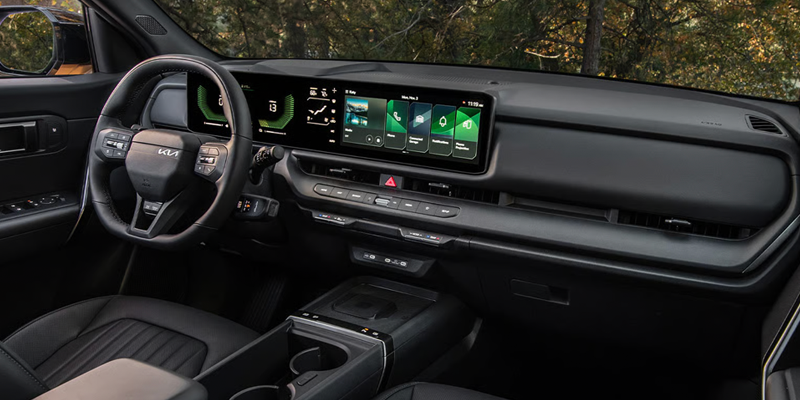
Imagine walking up to your Kia, hearing the doors unlock, and driving away without ever reaching for a key fob. That is the convenience of Kia Digital Key 2.0, a feature that turns your compatible smartphone or smartwatch into your vehicle key. Here is what it does, which models and phones support it, and how to get it set up.
What Is Kia Digital Key 2.0?
Kia Digital Key 2.0 stores a secure digital version of your vehicle key in your phone’s wallet app. Once paired, you can lock, unlock, and start your Kia with your phone, and share access with family or friends without handing over a physical key. Kia offers two versions, Digital Key 2 and Digital Key 2 Touch, and the one your vehicle uses depends on the model, year, and trim.
Digital Key 2 vs. Digital Key 2 Touch
Both versions replace your key fob for everyday driving, but Digital Key 2 adds hands-free convenience through ultra-wideband (UWB) technology.
| Feature | Digital Key 2 | Digital Key 2 Touch |
|---|---|---|
| Technology | NFC, Bluetooth, and UWB | NFC |
| Unlocking | Unlocks automatically as you approach | Hold the phone near the driver’s door handle |
| Starting | Start without taking your phone out of your pocket | Place the phone on the wireless charging pad, press the brake, and push start |
| Digital wallets | Apple Wallet, Samsung Wallet, Google Wallet | Apple Wallet, Samsung Wallet |
| Key sharing | Share with full or limited access | Share with up to three people |
Which Kia Models Offer Digital Key?
Digital Key is available on select trims of many current Kia models. Availability can vary by trim, so check the specific vehicle you are interested in.
| Version | Eligible Models |
|---|---|
| Digital Key 2 | 2024+ EV9, 2024+ Sorento, 2025+ Carnival HEV, 2025+ EV6, 2025+ K4, 2025+ K5, 2025+ Sorento HEV and PHEV, 2026+ Sportage HEV and PHEV, 2027+ Telluride and Telluride HEV |
| Digital Key 2 Touch | 2023 to 2026 Niro, Niro EV, and Niro PHEV, 2024 to 2026 Seltos, 2023 to 2025 Telluride |
How to Set Up Your Kia Digital Key
Setup takes just a few minutes. You will need an eligible Kia Connect subscription, the Kia Access app, and an active data plan for the initial pairing.
- Sit in your vehicle with your phone and at least one key fob, and turn the vehicle on.
- Open the Kia Access app, go to the Digital Key section, and follow the prompts to add the key to your phone’s wallet.
- On the infotainment screen, go to Setup, then Vehicle, then Digital Key, then Smartphone Key, and save your key.
- Place your phone on the wireless charging pad to complete pairing.
- Optionally, link your key to the Driver 1 profile so your seat and settings are ready when you get in.
Sharing Your Digital Key
Sharing is one of the most useful parts of Digital Key 2.0. You can send a key from your wallet app to a family member, friend, or anyone who needs temporary access, and you control what they can do.
- Full access: Lock, unlock, and drive the vehicle.
- Limited access: Lock and unlock only, which is helpful for dropping off a package or grabbing something from the car.
- Easy to revoke: Remove access anytime from the Shared Users list in your wallet app, and the other person is notified.
Kia notes that keys can currently be shared only between the same device type, such as iPhone to iPhone or Samsung to Samsung.
Helpful Tips for Everyday Use
- Low phone battery: Digital Key 2 Touch continues to work for a limited time after your phone loses power.
- Passive entry paused: Hands-free entry may pause to protect a low 12V battery. Press the door handle button or use touch mode instead.
- New phone: Delete your original key in the infotainment system, then pair your new phone through the Kia Access app.
- Lost or stolen phone: Lock your device with Find My (iPhone) or Find My Mobile (Samsung), which deletes the key. You can also remove it through the infotainment system, the Kia Access app, or the Owner’s Portal.
- Selling your vehicle: Delete your Digital Key profile first so all keys are removed.
Experience The Kia Digital Key at Cable Dahmer Kia of Lawrence
Seeing Digital Key 2.0 in action is the best way to understand how much easier it makes daily driving. Our team at Cable Dahmer Kia of Lawrence can show you how it works on models like the EV9, Sorento, and K4 and answer your questions along the way. Explore our new Kia inventory and schedule a test drive today.
Shop Kia
 Warranties include 10-year/100,000-mile powertrain and 5-year/60,000-mile basic. All warranties and roadside assistance are limited. See retailer for warranty details.